Wednesday, 16 January 2013

Why Should You Bother to Create Your Own Product?


At first glance, creating your own product seems like a big hassle when you could just sell other people's products and take an - often hefty - commission. Or you could go across to a resale rights site, buy a product for $10 or so and - if you believe the sales pitch - resell it to people for triple that amount or more. Of course, that second scenario doesn't actually pan out in real life, but you live in hope!
Selling other people's products
There are several problems with selling other people's products, especially if the other person is only someone that you've "met" on the internet.
Firstly, the other person may stop selling the product without notice. That's happened to me on a number of occasions. In one instance, I was making a good number of sales per month so I know it wasn't due to lack of profitability. They just disappeared off the face of the earth.
In other instances the product wasn't selling enough to keep the domain name going so, again, that negated all the time I'd spent promoting it.
Or, more recently, a software program I was promoting was removed because it no longer worked and it wasn't worth the developer spending the necessary money to bring it up to date.
So, as you can see, selling other people's products isn't the smooth path that people promoting affiliate marketing as an almost dream lifestyle quietly don't tell you. You have all the risk that any commission only salesperson has. Without necessarily getting the compensation to go with it.
Buying in re-sale rights
Resale rights are just that - the right (subject to certain restrictions) to sell a product as your own. The supermarkets do a version of this all the time - it's called white labelling because historically a product was supplied in plain white packaging, ready for the purchaser to put their own label on it. Nowadays all that is usually done by the manufacturer but the name has stuck.
With information products, you usually get a PDF book, maybe the Word document associated with it, possibly some audios and/or videos and maybe a sales letter and graphics.
Which sounds like a bargain until you find out that your granny could write a more compelling sales letter. Sure, the letter looks good but it doesn't do the job of selling.
Then there's the main product itself. 60 pages of (usually) ghost written content that's been researched - if indeed it has been researched - on Wikipedia and a handful of blogs.
There's a reason the original author didn't want their name on it.
Creating your own product
So long as you know your subject, this isn't actually as difficult as it sounds.
The main product just needs to be created - written or spoken or video - from an outline you create. So spend a while getting down the main sections and the sub-sections and the sub-sub-sections. Then create something valuable about each.
The sales letter doesn't have to be top quality copy. Sometimes home-made sales copy works a lot better as it doesn't come across that you're a slick salesman. Some sites even deliberately make their sales letters look like they weren't written by a professional - but we're often talking big money for that as these often are, and that kind of copywriter really isn't cheap.
Graphics can be done at sites like Fiverr and so long as you supply the original image that you've bought and got the license to, the results are fine and you won't get in trouble on copyright.
Then there's the advantage that you can use an affiliate program to resell your product and let other people act as commission only salespeople for you. It's win-win for you!

Friday, 11 January 2013

What Kind Of Online Business Model Best Fits Your Needs?


So you want to make money online and you want to do it quickly. After all, there's nothing better than rolling out of bed when you want and firing up the ol' computer to see how much money you made overnight. Whooaaa.... not so fast...
Before you can get to the part where you actually make money, you need to decide exactly what to sell. That's right, in order to make money online you'll need to sell something, usually a product or service. I'd like to help you decide what that something should be. After all, there are lots of choices. Unfortunately many of them lead to a dead end, wasting your time and money in the process. The following plan will help you avoid all that. When deciding what to sell online, you need to consider the three basic online business:

Buying and Selling
2. Creating and Selling
3. Selling Existing Products and Services
Each of these three options have successful models and unsuccessful models. So let's run down each of the options above, starting with choice number one...

1. Buying and Selling

You could use the basic retail model, where you sell like a retail store, except with less overhead than a brick and mortar store. But that's an expensive endeavor. Perhaps that's why the most common strategy for buying and selling on the Internet is starting an Ebay business. In this model, you purchase items, usually at wholesale and then sell them at a higher price by auction.

There are two keys to success in this strategy... finding the right niche and finding the right wholesale sources for products in that niche. An eBay type business can be a lot of work. However, if you like this business model and have your heart set on trying it, there are still some opportunities for new players, if you are clever.

Here's an example of what I mean by "clever"...
A couple years ago I met a neighbor of mine who makes his living buying things locally and selling them on the web. He specializes in antique furniture and other old items from my geographical area. He spends a few hours a day visiting flea markets, yard sales and local auctions. With a knack for spotting deals, he snatches up anything he considers grossly underpriced then markets it internationally, via the web.

OK, "market it internationally" may be a bit too fancy of a description for what he does. Basically, he takes a couple of snapshots of each item using his digital camera then sells the items at auction on ebay.com - the number one meeting place for buyers and sellers across the world. And believe it or not, he makes quite a comfortable living doing this. It works for him because he has a unique selling position.

His unique position happens to be his location. The region where he lives a great place to find many undervalued antiques and other authentic items. He's simply finding a new home for the items and filling a need at the same time. After all, where else would someone from say, Australia, find an authentic antique table from another country?

This is the path I chose to make my own living online. (I also mix in choice three below, buy I'll get to that in a minute.) I prefer the "creating and selling" strategy above all others, since I have complete control over exactly what I sell and how much profit it yields. I sell information and services. I create my products and services using my computer and then mold them into many different marketable formats including print books, ebooks, software, consulting and advertising services.

If you have, or can research and gather information on a niche topic, you can make money using this model. For centuries, people have been making money selling information and related products and services, and it will continue forever. It all boils down to helping people save time and money avoiding learning something the hard way -- through research. Basically, you do the research and sell the results. The better the information and services, the higher prices you can demand.

With a global audience online, you can create and sell just about anything! If there is a market for it, you can build a business around it. And therein lies the equation... Before starting ANY business you must consider carefully, WHO you will be promoting to. Think hard about the people who might be interested in what you plan to sell. And beware... if the answer is "everyone", that's usually a BAD thing.

Identifying a niche market gives you the ability to target ONLY your prospects you spend FAR less marketing and advertising. So do some market research BEFORE you start creating your product. I'll list some good research sites at the end of this article, that will help you determine if there is a need for your product. Finally, let's consider a third angle for those of you who do not have the time or inclination to "create and sell"...

3. Selling Existing Products and Services

You can start a new business online selling existing products and services. You simply earn a commission from each sale you make. The commissions can be one-time or recurring depending on the product or service you sell for the merchant. There are affiliate programs on just about any niche product or service you can imagine. Whatever niche you plan to develop your business around, you'll more than likely be able to find affiliate programs you can join.
And that is the key... choosing a niche that interests you. Something you enjoy doing or talking about. You may be surprised to find out that you can make money in just about any niche imaginable. Selling existing products and services is not just for new businesses.

It is also a great strategy for established businesses who want to grow their bottom lines. When done properly, it can yield income growth of more than 30% literally overnight. How can I make such a bold statement? Simple, I've experienced just that, by simply selecting existing products and services carefully and then introducing them to my current prospects and customers. The common thread in all three strategies...

In case you didn't notice, all three money making strategies above contained one common component -- proper niche selection. While you should choose a niche that interests you, you also need to choose a niche that can be profitable. To determine if your niche can be profitable, take a few moments and visit the following websites.

1. Ebay's Pulse lists popular searches as well as most watched items.
You can also search through just about any category imaginable.

2. Google's Zeitgeist shows weekly, monthly, and annual trends based on the millions of searches done at Google's search engine. Zeitgeist by Country is also available on a monthly basis.

3. Google Adwords Keyword Tool is a free tool that gives you reports on keywords and keyword phrases that you enter into the search box. Statistics show how many users search for you keyword on Google.

4. WordTracker Free Tool shows you the daily searches being done on any keyword or keyword phrase.

Sunday, 6 January 2013

Best Facebook Photo Sizes: Cover, Profile, Wall Photos & More!


Want to know the best Facebook photo sizes? Here’s ALL the info you need to create and size your photos and graphics to look their best on Facebook.

Facebook Cover Photo Dimensions

Starting at the top, your Cover Photo will be displayed at 851 pixels (px) by 315px. You have the opportunity to adjust the cropping, but cannot resize the image that you upload or choose from your albums. To ensure you’ll like the results, size in an image editor before uploading.

Facebook Profile Picture Size


The Facebook Profile Picture is displayed on your Fan Page at 160px square, but must be uploaded at least 180px square. You can also upload a larger image, preferably in a multiple of 180, such as 360, 540, or 720, and Facebook will resize it for you. This may give you better clarity, and will definitely give you a larger image in your Photo Album!

Facebook Fan Page Tab Images (Thumbnails)

The Tab Images, or Thumbnails that appear under your Cover Photo, are 111px wide by 74px high. Keep them simple – maybe just type that expresses a call-to-action.

Facebook Fan Page Tab Favicon

A favicon for a web page is a tiny 16px square image that appears in your browser’s address bar. Well, FB Fan Page Tabs also have tiny 16px favicons too! When you click the drop-down arrow at the end of the row of Tab Images, you’ll see the app favicons below the Tab Images, to the left of the text name of the tab. These can be replaced with custom favicons at the time you create a custom tab by followingthese directions. Woobox tells me you can’t change them on a tab you already have installed.

Facebook Fan Page Tabs


Your Fan Page tab itself can be a single image. The width of the tab is 810px, and the maximum height for a full-tab image is 1200px. This is the only Facebook image that I’ve found to have a file size restriction, and it’s 400kb. Choose the appropriate compression when saving your jpeg, It won’t upload if larger than 400kb.

Facebook Wall Photo Size


Photos shared on your wall are displayed as a 403 pixel square image. For best photo quality, size and crop photos for wall posts at least 480 pixel square. 960px is optimal. These will be displayed at 403 pixels square on the Timeline with no cropping made by Facebook.
If you upload a horizontal photo at 403 pixels wide, it will be shown in its entirety. A wider horizontal photo will have the edges cropped off.
In my experience, photos less that 403px wide sometimes get sized up on your wall by Facebook and sometimes don’t! Vertical photos will be cropped top and bottom to a square shape, but the placement of the crop can be adjusted once it’s on the wall.

Facebook Photo Viewer Photo Size

Photos you’ve uploaded will appear in the Photo Viewer, or lightbox, at the size you uploaded them, up to 960px x 960px. Themaximum Facebook photo size for upload and download is 2048px square. If you upload a larger image, Facebook will reduce it so the longest side is 2048px, but it will appear in the Photo Viewer no larger than 960px on the longest side. It can be downloaded at the full size, however.

WARNING: Photos you upload to Facebook can be downloaded by anyone you’ve allowed to view them in your permissions. Any images could thus be reused, even though this is a copyright infringement (unless you have given permission). How to Report Claims of Intellectual Property Infringement

You’ve also allowed Facebook to distribute your images according to their Terms of Service:
For content that is covered by intellectual property rights, like photos and videos (IP content), you specifically give us the following permission, subject to your privacy and application settings: you grant us a non-exclusive, transferable, sub-licensable, royalty-free, worldwide license to use any IP content that you post on or in connection with Facebook (IP License). This IP License ends when you delete your IP content or your account unless your content has been shared with others, and they have not deleted it.
I recommend you NOT upload your professional images at high resolution unless you have a specific reason to do so (i.e. you want fans to download printable images of an event, for example) and also suggest you watermark your images.

Facebook Milestone or Highlighted Post Photo Size

Milestones and Highlighted Posts span both columns of your Timeline, and are displayed on your Wall at 843px wide by whatever height you choose, up to 403px. I like uploading a variety of heights – skinny ones like the one below break up space on the Wall, but become pretty small in the News Feed.
Milestone photos less than 843px wide will be centered in the space.

Link Thumbnail Size


Dimensions of the link thumbnail: 90px x 90px, but caries with shape of photo. This is the small icon that appears with a link on your wall. If you’re posting the link through Facebook, and the linked page includes photos, you can use the arrows to choose the desired thumbnail, or check the box for no thumbnail.

Thursday, 3 January 2013

How to Create a Visible & Engaging LinkedIn Profile


While the LinkedIn Profile change has impacted the design and user experience, it hasn’t necessarily impacted how you’re found on LinkedIn. For those of you who are new to LinkedIn, the importance of getting found by your target audience on LinkedIn is equally as important as it is to engage that person once they find your profile.
With more than 175 million users (many of whom are executives and decision makers), you would be hard-pressed to get their attention without actively doing something to get found and then engaged.
Here are the steps you need to take to make your profile visible and engaging so that qualified leads start flying into your LinkedIn Messages Box.

1. Define Your Personal Branding Goal

The first and most crucial step to driving qualified leads via LinkedIn marketing is for you to assess, define, and build out your market differentiators and value of you as a personal brand. To do so requires introspection on several levels.
You need to define your goals for being there:
  • What are you trying to accomplish by being present and active on LinkedIn?
  • Are you truly interested in being a business resource?
  • Is your goal to become a thought-leader in your industry and captivate the inquisitive minds of business professionals who use LinkedIn as their main news source?
  • Are you simply looking to use the social networking tool to augment and complement your other online marketing efforts in your sales efforts?
Defining your personal branding goal is the first action you need to take. Do it now. Write it out because this will set the tone for your new LinkedIn Profile.

2. Determine Your Personal Branding Keywords

Before you start to create or enhance your LinkedIn profile, you need to then determine, what I call, your personal branding keywords. These are the keyword phrases that brand you. They define:
  • What you do.
  • Who you do it for.
  • Where you deliver your service (location).
  • Where you add value.
  • In what area you have a focused expertise.
You will want to come up with initially your top 10-20 personal keywords phrases. Then drill down to a solid 2-3 that line up with what you state in your headline, your summary, and what you substantiate throughout your work history and skills.
Primarily, the LinkedIn search engine is looking for these keywords in your title/headline, custom URL, your skills, and your work titles.

3. Highlight Your Experience, Skills and Expertise

jasmine-sandler-linkedin-profile
At this point, you can then review what your current LinkedIn profile looks like and determine changes in your URL, headline, summary, work experience, and skills.
  • Custom URL: Your LinkedIn custom URL is your brand statement.
  • Headline: Your Headline reflects what it is you want to be known for (going back to Step 1 and defining your personal branding goals).
  • Summary: Your Summary is important. It says hello to your audience in such a way that engages, but doesn't sell and provides direct examples of credentials, awards, experience. This is a great place to provide link addresses of supportive and contact information, such as your website, your blog (if hosted off-site), your e-mail address, reports/articles/whitepapers/books you have published, and links to video content.
  • Skills & Expertise: Your Skills are truly areas where you have confirmed experience, and better yet, expertise. Your Skills should match the work experience you deliver throughout the profile, so that skill keywords are found in job titles and descriptions.

4. Develop a Written Target Market Definition and Strategy

Remember that your profile reads top to bottom and is your story of your personal brand – where you excel, how you add value – and addresses your specific target audience. It's important, then, in the exercise of making your LinkedIn profile more engaging, to develop a written target market definition and strategy.
List out what you will provide to said target (products/services/types/way of delivery) and create some real user paths, like we would say in web design user experience. Take it a step further and then relate customer/client needs/pain points to your solutions. The more you deliver a path of credibility in direct relation to your target’s specific needs, the more chance for qualified lead generation success.

Win LinkedIn Engagement

It isn't enough for you to drive visibility in the LinkedIn search engine. What about engaging your target when they aren’t necessarily looking for someone like you, but when they may be active in their Groups or looking for Answers?
These “personal brand impressions” (or so I call them) make all the difference between a cold and warm lead. You must be active in these areas for people to find your profile and find out all about you (and then Message you).
My next Search Engine Watch article later this month will provide an actionable way for you to win in LinkedIn engagement off the Profile. Happy New Year!

Friday, 28 December 2012

2012’s social media marketing hits and misses


With social media, it couldn’t be easier for brands to connect with their fans and launch new marketing campaigns. Sometimes, they get it so right we have to commend them. Other times, they get it so wrong that we can’t help but facepalm in their general direction. Join us for a run-down of this year’s memorable moments, successes and mishaps of online marketing.

Hits

Samsung

With it being so easy to connect with brands these days, fans can get in touch with the wildest requests. One man this year visited the Samsung Canada Facebook page to ask for a free Galaxy S III smartphone in exchange for his crude drawing of a dragon. At first, Samsung declined the request but gave the fan a similarly child-like doodle of a kangaroo instead. The exchange went viral on Reddit and, apparently delighted with the free publicity the eager fan’s request earned, Samsung decided to fulfil his request after all – complete with custom dragon packaging, covers and wallpaper.
Fan's custom Samsung Galaxy S III

ASOS

Someone, somewhere picked up that this seemingly innocent blouse with contrast piping bears a strikingly phallic symbol on the chest, and what was seen could never be unseen. The hashtag #penisblouse began trending on Twitter and, instead of being embarrassed, ASOS cleverly turned the humorous situation into a sales pitch, asking users to tweet images of them wearing the blouse. Even the ASOS team behind the well-endowed creation joined in the fun.
ASOS penis blouse
ASOS penis blouse

Bodyform

When a disgruntled man took to Bodyform’s Facebook page to complain about the lies perpetrated by the brand, the post was a viral success. What was an even bigger hit, though, was Bodyform’s response.
Bodyform Facebook complaint
 

LasVegas.com

When Prince Harry was caught with his pants down in Las Vegas this summer, LasVegas.com spied an opportunity to revitalise its ‘Know the Code’ campaign. The code being, of course, ‘What happens in Vegas, stays in Vegas.’
The site blasted the ‘exploiters’ that outed Harry on Twitter and used the royal scandal to spread its #KnowTheCode hashtag. Tourism in Las Vegas reportedly saw a boost shortly afterwards, but there’s no telling if this was a direct result of the marketers or the allure of the crown jewels.
LasVegas.com #KnowTheCode

Oreos

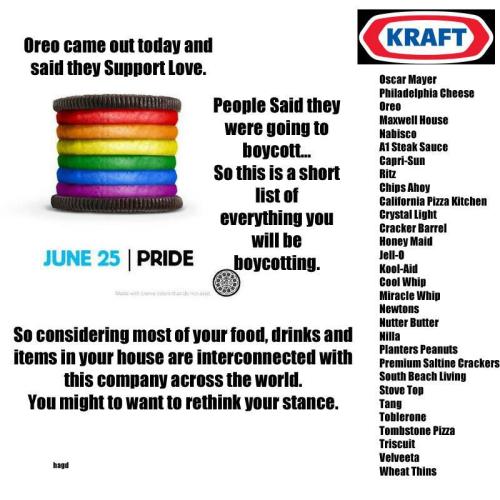
Earlier in the summer, Oreo faced backlash for a post on its Facebook page that saw the famous treats don the rainbow colours for LGBT Pride Month. While Oreo was shouting about its proud support of love, critics of gay marriage began shouting back, threatening to boycott Oreo and parent company Kraft.
Oreo Pride
Others, who met Oreo’s posting with positivity, challenged the naysayers to boycott all companies that have positioned themselves in support of gay rights, including Google, Apple, Amazon, General Motors, Coca-Cola, Microsoft, Nike – the list goes on. Even just a boycott of Kraft foods would leave many cupboards fairly empty.
The stuffed biscuit remains one of the biggest brands on Facebook, with 30m likes and, with the opponents made to look foolish, Oreo (and gay rights) were the real winners this time around.

That Big Event in London

This pop-up brand began selling its ‘reality check’ souvenir tote bags and T-shirts online ahead of the London 2012 Olympic Games. The stg£15 merchandise bore subversive slogans like ‘They’re all on steroids’, ‘It only took me three hours to get to work this morning’ and ‘I’m renting my flat to a fat American family’, though the latter in particular attracted the ire of Team USA’s supporters on Facebook.
That Big Event in London reality check souvenir T-shirts
However, the negative comments did not detract from sales and stock was flying out, with designer Toby Leigh saying plenty of American tourists with a sense of humour were even picking them up.

Susan Boyle’s PR team

An unfortunate sequence of characters, or a marketing genius at work? That was the question when the hashtag selected to promote a listening party and Q&A for Susan Boyle’s new album was #susanalbumparty. Twitter investigator Is Twitter Wrong? discovered that the hashtag double entendre did indeed originate from the officialSusan Boyle Twitter account, but was later changed to #SusanBoyleAlbumParty.
#susanalbumparty
While it’s likely the PR gurus regretted their original choice, we still think they’re winners having achieved wider reach than expected with the dodgy one.

Misses

McDonald’s

What began as a well-intentioned hashtag ended up as a ‘bashtag’ when Twitter users hijacked the McDonald’s #McDStories tag with horror stories from the fast-food chain. References in the tweets ranged from obesity and diabetes to fingernails discovered in fries. Even McDonald’s couldn’t put the genie back in the bottle and, even though the campaign was pulled, the bashtag continues to be used negatively.
#McDStories
#McDStories

Starbucks Ireland

The Starbucks Ireland Twitter account got a little carried away with Queen Elizabeth II’s Diamond Jubilee celebrations this year, apparently forgetting that Ireland is no longer a part of the Queen’s realm. A tweet asking followers what made them proud to be British provoked backlash and prompted an apology from the coffee makers.
Starbucks Ireland

NBC

During the 2012 Olympics, one of the biggest trending topics on Twitter was #NBCfail, owing to the US network’s decision to delay coverage of some events for prime-time viewing, even though there was little viewers could do to avoid hearing the results of every event on various social media channels in the interim. NBC even live tweeted the opening ceremony hours before they would broadcast it themselves. To add more fuel to the fire, the opening ceremony commentators showed their ignorance as country’s names were mispronounced and presenter Bob Costas tried desperately to find something relevant to say about nations he clearly knew very little about.
NBC fail

American Apparel, Gap, Urban Outfitters, CelebBoutique and Kenneth Cole

Piggybacking on a trending topic is a common social media marketing ploy, though that doesn’t mean all trending topics are fair game. Here we have just some of the year’s misguided brands that thought tragic and devastating events such as Hurricane Sandy, the Aurora shooting and the uprising in Egypt were fodder for their marketing messages.
American Apparel
Gap
Urban Outfitters
CelebBoutique
Kenneth Cole

Cinnamon

Cinnamon café in Ranelagh, Dublin, made the headlines this year for breaking the golden rule of interacting with customers on social media: don’t resort to name-calling.
Cinnamon
That said, the Dublin 6 café did sweeten its apology with special discounts on coffee for customers that quoted ‘Twittergate’, retaining some semblance of class.

Celina

But it’s not just brands that need to learn when to hold their tongues on social media, as one Facebook user who decided to use this platform to voice a complaint to Treacy’s Hotel Waterford has learned. Unfortunately, it seems this lady had been misinformed about the events that transpired on her fiancé’s stag weekend. The entire exchange is wonderfully acted out by Final Boss Media below, but beware: NSFW language comes with.
 

Death by social media

And finally, we’ll take a moment to remember those that were mistakenly declared dead by social media users this year. Morgan Freeman is constantly falling victim to these hoaxes, and this year he was joined by Mick Jagger, Bill Cosby, Reese Witherspoon and Keanu Reeves – all of whom are alive and well, I assure you.
Worse still are the tweets from users following the death of a high-profile public figure, confusing the dearly departed with someone else. To clarify: Neil Armstrong, astronaut, died in August 2012; Billie Joe Armstrong, frontman of Green Day, is still going strong.
Neil Armstrong Twitter fails
These are likely the same people that were surprised to find out that the Titanic was real.

Wednesday, 12 December 2012

4 Unique Ways to Use Facebook for Your Business

Are you wondering how to best use Facebook for your business?
Should you open your personal profile with a Facebook Subscribe button? Would a Facebook Group work well for your business?
The simple truth is that Facebook Pages are not being seen as often in the news feed.
Facebook reported that on average, brands reach about 16% of their fans in a typical week through posts. This news has many people wondering if Pages are still a worthwhile endeavor.
Find out how to choose the best marketing strategy that fits your business by answering these simple questions.

#1: Have multiple employees?

If so, I still recommend having a Facebook Page despite the visibility issues. Let’s face it; every marketing channel has visibility issues. You will never reach 100% of your customers all of the time. Facebook Pages have advantages for your business that Groups and the Subscribe button don’t.
First, Facebook Pages are branded. You are using your company name and logo to increase your brand awareness, and your Facebook Page can showcase your brand personality as people read through your Timeline. Find out more about creative ways businesses are using Timelines.
You can also participate on Facebook as your brand by commenting on other Pages as your Page to increase visibility.
facebook branding
Use a Facebook Page for great branding and added apps.
Second, you can advertise a Facebook Page. Even with GM’s announcement that they will not be using Facebook Ads, they are still effective for other brands and companies. Test to make sure Facebook Ads are working for you and follow these tips on how to use Facebook Ads.
facebook ad
Advertise your Page to get the Like, but the text can also provide an offer.
Third, you can run contests and have special apps that give your Page some bells and whistles. Facebook Offers and check-in deals are also perks that many companies can use in their Facebook marketing strategy that are only available through Pages.
facebook offers
Use Offers to provide a unique way for people to get discounts and offers from you.

#2: Want to brand yourself?

If you are the face of your company or you want to brand your name, you may also want to consider opening up the Subscribe button on your personal profile. Some people will want to connect with you personally rather than on a Facebook Page with a logo. Find out more about the Subscribe button.
subscribe button
If you are the face of the company, people will want to connect to you personally.
You don’t have to worry about your privacy because you can easily control who sees your posts.
public posts
Use your public posts to talk about your business and things that you would like to publicly share.

#3: Are you self-employed?

If you’re a solopreneur or branding your business with your name, deciding your Facebook strategy could be a little more challenging. Because posts from personal profiles are showing up better in the news feed, people who have their Subscribe button open on their personal profile are seeing more new subscribers than fans.
So does that mean you should ditch the Page altogether? Not necessarily. Take a look at some of the advantages of having a Page listed in point #1. If you would like to run a contest or an ad, or have special apps or coupons, then you will need a Page.
There is also the consideration of promoting your business on your personal profile. Facebook terms state that you aren’t supposed to “use your personal profile for commercial gain” as shown under their Statement of Rights and Responsibilities, but this statement is not exactly crystal-clear.
To be on the safe side, if you are using your personal profile for business postings, I would talk more in terms of what you are doing in your business rather than telling people outright to purchase your products or services. A soft-sell approach usually works better anyway.

#4: Manage groups of people?

Groups are perfect for businesses that are “naturally” groups:
  • Networking groups
  • Groups of coaching clients
  • Social groups
  • School groups
  • Niche-focused groups
We have a great post on how to take advantage of Secret Groups for your business.
I don’t believe that Groups work well to promote an entire company or brand unless your business is only about bringing together a network of people in some way.
There are a few reasons Groups will irritate your potential clients if you use them as your main vehicle for marketing on Facebook. Here are the main irritants:
  • You may be adding people to the Group who don’t want to be added. Anyone can add other people to a Group once they are in it. And that can irritate people who don’t want to be part of that Group.
  • Many people don’t know how to turn off the notifications in a Group and they may get irritated and opt to stop getting all the updates. If you do run a Group, make sure people know where the settings can be changed.
group notifications
Make sure the Group members know that they can change their notifications.
If your business is about networking or bringing people together into natural groups, then Facebook Groups can be a great addition to your marketing mix. You can use Groups to communicate, schedule events, share documents and more.
facebook group events
Use the Events and Document-sharing features of the Group to enhance the experience.
A local group of business owners can be a great way to stay connected and promote your business news. You may want to set up promotional rules of the Group so that group members know how often and what to post.
local business networking
Be a leader and start your own local group of business networkers.
You can also use Groups as an added bonus for your coaching business. Give your clients an inner circle where they can connect and ask questions and network together.
coaching group
Use a Group to give an added bonus to answer ongoing questions if customers purchase a product.
Hopefully by answering these four questions, you can make the right choices on where you should be participating on Facebook to get the most out of your marketing strategy. And possibly these suggestions have sparked some new and fresh ideas to take your marketing to a new level!

Monday, 3 December 2012

5 Ways to Get Nothing Done

With rare exceptions, everybody wants to be productive. It means advancing your career, feeling a sense of accomplishment and even opens the opportunity for guilt-free vacations and rest. There are plenty of ways to circumvent your own productivity, though. If you’re bent on sabotaging your todo list, here are a few options to consider.

Set Alarms for Everything

When it comes to distraction, there’s nothing like having alarms go off while you’re working, urging you to do something else. It’s a great way to break your concentration and ensure that you have a persistent feeling of panic throughout the day.
Alarms are for events you can’t miss, not for tasks. The Pomodoro technique may be an exception if you’re using it to eliminate anxiety instead of create it. For everyday work, though, I’ve found it’s important to train myself to check my schedule consciously, and allow myself to dictate any anxiety surrounding due dates. Chances are you’re not going to forget the looming task due by the end of the day, and having your next task ding at you isn’t going to help get either one done.

Be Social

We all need a break now and then. Check Twitter, scan Facebook, and maybe fire off a few emails and texts to see how friends are doing. Keeping all of those outlets available all day is a guaranteed way to ensure that you’re never fully focused on what you’re doing. Chat rooms and IM are even better; it’s like a water cooler that comes to you.
When it’s time to work, shut off your Twitter client, turn off notifications on your mobile devices and close all those browser tabs that are going to tempt you into just “checking.” Go “dark” wherever you can. It seems obvious, yes, but I’m betting that I’m not alone in wavering on this.

Lump Your Tasks Together

If you want to end a day feeling like you accomplished nothing, make sure that all of the items on your to do list are “big picture” projects. Overarching concepts with no sequential set of smaller tasks are a perfect way to make any job seem overwhelming.
If, instead, you want to make progress and see results, you might want to break that “year end report” task into a series of smaller tasks that you can actually tackle. Mark them off one at a time, and keep moving forward. At the end of the day you’ll be rewarded by a series of checkmarks and an easy way to see how far you have (or don’t have) to go to finish the project.

Say “Yes” to Everything

If you say “yes” whenever someone asks you if you can “fit it in” or help out with something, you’ll easily ensure that you don’t get done what you already need to, with the added bonus of not helping anybody out successfully.
If you’re a little more thoughtful with what you agree to, you can keep life manageable and, ultimately, get more done. Remember, saying “yes” to one thing means saying “no” to something else, and vice versa.
Being constantly busy is not a sign of productivity. Being able to finish what’s on your plate and take a break is.

Don’t Sleep

Working all night to finish a project can accomplish great things. For me, even the next day is productive. Then, I lose two, maybe three days of productivity as my body and brain crash and struggle to catch up. Assuming that your life is a series of tasks and not one big, end-all job, maintaining a sleep schedule and finding a healthy equilibrium is vital to actually doing anything.
Set a bedtime. It doesn’t have to be strict, but let your mind stop for a while. Learning to clear my mind at the end of a busy day is a skill I honed, and I have no regrets. More often than not, my mind solves problems that were slowing me down while I sleep. Letting your subconscious do some of the lifting can help your conscious thoughts be even more productive.